Facebook Video Downloader Guide: HD Downloads, Reels, and Every Link Type in 2026
You can download Facebook videos and Reels from any public link in HD, with no app and no login. Facebook gives no download button for other people's videos, so a browser-based downloader is the standard way to keep a clip offline. This guide covers the four-step method, the five link types that work, how to get HD instead of blurry SD, and how Reels, Watch videos, and Live replays save. It also lists what cannot be downloaded. The same steps work on Android, iPhone, and any desktop computer browser today.
Key facts at a glance
Output: MP4 video up to 1080p, or MP3 audio up to 320 kbps.
Quality: HD when Facebook stores an HD version; no tool can upscale SD.
Access: public posts, Pages, and open groups only.
Watermark: none added.
Cost: free, no login, no daily limit.
One Public Link Is All It Takes to Download Facebook Video in HD
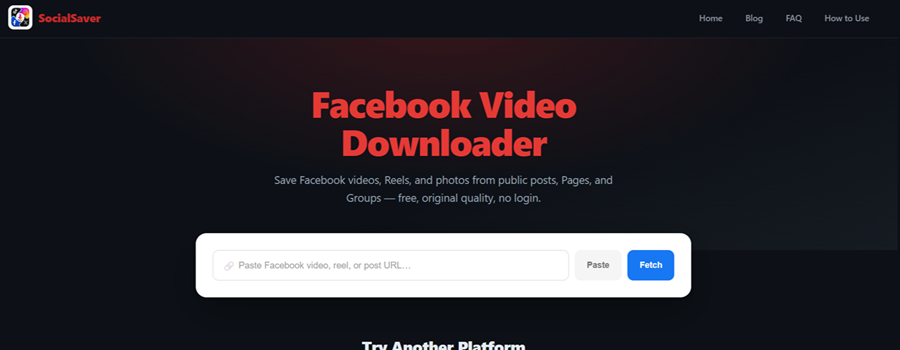
A Facebook video downloader turns a public post link into an MP4 file saved on your own device. The tool reads the link, finds the video file Facebook already serves to viewers, and returns a direct copy. Anyone searching for an FB video downloader, or for Facebook with a video downloader built in, is looking for this paste-and-fetch process. Searches such as "download FB video downloader" and "FB video downloader download" usually mean the same thing: a tool that saves the file, not an app to install.
socialsaver.net runs that process in the browser. The socialsaver.net Facebook video downloader accepts feed videos, Reels, Watch clips, and Page videos, and returns the HD version whenever Facebook has one. It asks for no account and installs nothing. The result is a standard MP4 that plays in the default video player on any phone, tablet, or computer.
Facebook's own Save option works differently. It bookmarks a video inside the app, but the bookmark breaks the moment the poster deletes the video. A downloaded MP4 is a permanent local file that plays offline and moves to any device.
The audience for this is huge. Facebook passed 3 billion monthly active users in 2023, and 71% of U.S. adults use it, according to Pew Research Center. The same method covers Instagram, TikTok, and X in the complete guide to downloading videos from Facebook, Instagram, TikTok, and X.
How to Download Facebook Videos in 4 Steps on Any Device
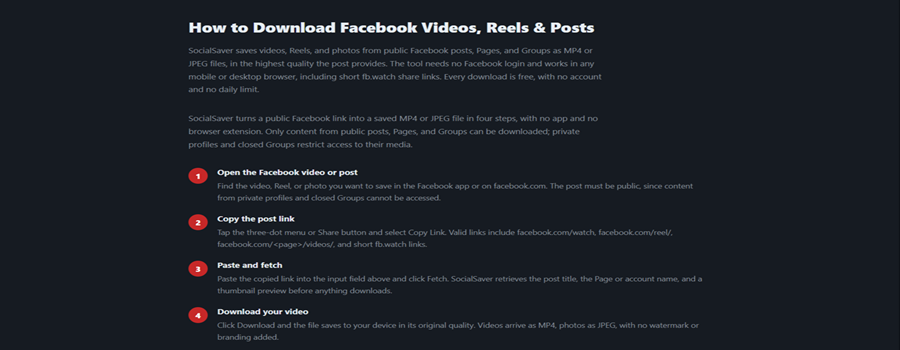
Facebook videos download in four steps that stay the same on Android, iPhone, and desktop. The only requirement is a public post, because private profiles and closed groups restrict who can see their media.
Find the video: Open the public video or Reel in the Facebook app or on facebook.com.
Copy the link: Tap Share, then Copy link, or copy the URL from the address bar. Keep the full link, since it carries the video ID.
Paste it into socialsaver.net: Open the Facebook tab on socialsaver.net, paste the link, and tap Fetch. The title, thumbnail, and available qualities load within seconds.
Pick a quality and save: Choose HD to download Facebook video at its sharpest, or MP3 for audio only.
Downloading video on Facebook this way needs no app and no Facebook login on any device. The saved file lands in the default location:
Where your Facebook download saves
├── Android ......... Downloads folder, usually shown in the gallery
├── iPhone / iPad ... Files app > Downloads (share to Photos for camera roll)
└── Windows / Mac ... Downloads folder (change it in browser settings)
A short clip saves in a few seconds; a full-length HD video takes longer only because the file is larger. Most failed fetches trace back to the link itself.
5 Facebook Link Types Work, and 1 Common Mistake Breaks Them
Facebook uses five common link shapes, and all of them point to the same kind of video file. The mistake that breaks a download is pasting a link to a feed or profile instead of a single post.
Link type | Pattern | What it holds |
Watch video | Feed and Watch videos | |
Reel | Short vertical Reels | |
Page video | Videos posted by a Page | |
Share link | Newer app share links | |
Short link | Redirects to the full video page |
Short fb.watch links resolve to the full facebook.com address on their own, so there is no need to expand them. Links copied from the mobile site (m.facebook.com) work exactly like desktop links. Share links in the facebook.com/share/v/ format come from the newer Facebook app and also resolve to the original video page.
If a paste fails, copy the link again from the post's Share menu instead of typing it by hand. A complete, untrimmed link is what lets the tool find the exact video. The right link also decides whether you get the sharp version of that video.
Why Facebook Downloads Turn Blurry, and How to Get the HD Version
A Facebook download turns blurry when the tool saves the SD version instead of the HD one. Facebook stores most videos in two encoded versions, an HD variant and an SD variant, and many tools grab the smaller SD file by default.
socialsaver.net checks for both versions and fetches the HD variant whenever Facebook provides one, up to 1080p. A video uploaded in 720p downloads at 720p, not as a soft 360p copy. When you choose a Facebook download video option in HD, the file is larger but noticeably sharper on a TV or monitor.
One limit applies to every tool. If Facebook stored only a low-bitrate SD version, which is common for older uploads and heavily re-shared clips, no downloader can create HD from it. Any site that promises to upscale SD into true HD is misleading, because the missing detail does not exist in the file.
Version | Resolution | Typical size per minute | Best for |
HD | 720p to 1080p | About 30 to 60 MB | TVs, monitors, editing |
SD | 360p to 480p | About 5 to 15 MB | Phones, limited storage |
To check which version you saved, open the file's details on your device: if the shorter side of the frame is 720 pixels or more, the file is HD; 480 pixels or less means SD. An FB download video in HD is worth the extra space for anything you plan to watch on a large screen.
The same HD rule applies to Facebook's short vertical format.
Facebook Reels Save as Vertical MP4s, Even When They Started on Instagram
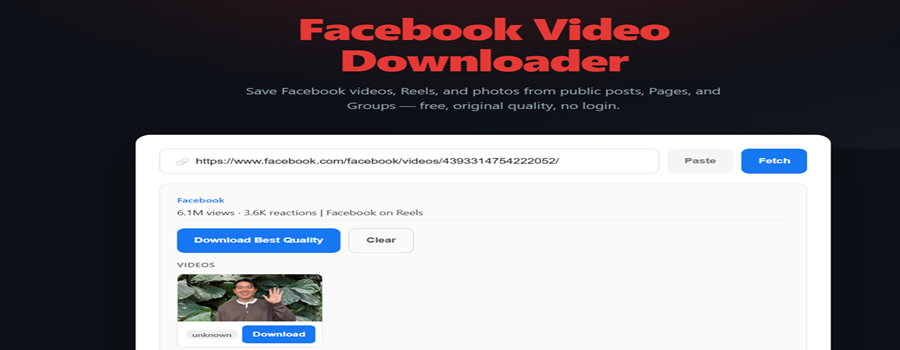
Facebook Reels download through the same paste-and-fetch method as feed videos and save as vertical 9:16 MP4 files. Copy a link in the facebook.com/reel/ format, paste it into the Facebook tab, and the Reel saves at its native resolution with the audio Facebook serves.
Many Facebook Reels are cross-posted from Instagram, because both apps run on Meta's shared Reels system. A cross-posted Reel is the same file on both platforms, so it downloads identically from either link, as the Instagram video downloader guide to Reels, posts, and photos explains.
One audio rule is worth knowing: if Facebook muted a licensed track on a Reel, the downloaded file is silent too, since the sound was removed at the source. Most Reels are short, so even a full-resolution Reel is usually a small file. Reels are one Facebook surface; Watch, Pages, and groups are others.
Watch, Pages, and Public Groups Follow One Simple Access Rule
Videos from Facebook Watch, public Pages, and open groups download with the same link method. Facebook Watch is the platform's dedicated video hub, and a Watch link fetches exactly like a feed video.
Page videos work without any extra step, since Pages are public by design. News outlets, sports clubs, creators, and businesses publish most of Facebook's public video through Pages, which makes Pages the most reliable source for downloads. Group videos download only when the group is public; being a member of a private group does not make its videos reachable by a link-based tool.
The rule is consistent across every surface: if a video plays in a browser tab where you are not logged in, you can download FB videos from it. Live broadcasts follow the same rule, with one timing condition.
Facebook Live Replays Download Only After the Broadcast Ends
A Facebook Live replay downloads once the broadcast has ended and the recording stays public. A stream cannot be saved while it is still airing, because no finished file exists until the broadcast stops.
When a finished live video remains on a public profile or Page, its link works like any standard video. socialsaver.net returns the replay as an MP4 in the best available quality. Replays are often long, so a one-hour broadcast in HD can reach 2 GB or more; downloading over Wi-Fi avoids surprise data use. Pages often archive replays after a short time, so saving a tutorial, Q&A, or event recording early is the reliable way to keep it. Some Facebook content stays unavailable no matter how quickly you act.
Private Profiles, Closed Groups, and Region-Locked Videos Stay Out of Reach
Private and restricted Facebook videos cannot be downloaded from a link because Facebook shows them only to approved viewers. That boundary protects the poster's privacy, and a legitimate tool respects it.
Private profiles and friends-only posts: visible only to the poster's chosen audience.
Closed and private groups: visible only to members.
Stories: expire after 24 hours, so no lasting link exists.
Region-locked videos: blocked in some countries by the poster or by Facebook.
Messenger videos: private chats are not public posts.
Facebook's own Save and Download options inside the app follow the same privacy settings, so no method bypasses them. A simple test covers every case: if the video will not play in a logged-out browser tab, no downloader can reach it. A video that exists only in SD also cannot be turned into HD by any tool.
Frequently Asked Questions
How to download Facebook clips?
Facebook clips download like any public video. Copy the clip's link from the Share menu, paste it into an online Facebook video downloader, choose HD or SD, and save the MP4. Short clips usually finish in a few seconds on a normal connection.
How can I save a Facebook video to my phone's gallery?
On Android, a downloaded Facebook video usually appears in the gallery automatically. On iPhone, open the Files app, find the video in Downloads, and use the share option to save it to Photos, which places it in your camera roll.
Can I save only the audio from a Facebook video?
Yes. Choose the MP3 option after fetching the link, and the sound saves at up to 320 kbps. This suits speeches, lectures, and music clips, though the final quality depends on the audio Facebook originally stored with the video.
Is there a daily limit on Facebook downloads?
No. socialsaver.net places no daily cap on Facebook downloads, so you can save as many public videos and Reels as you need. The service stays free through advertising, with no premium tier, locked resolution, or download charge.
Do downloaded Facebook videos have a watermark?
No. Downloaded Facebook videos and Reels carry no watermark or added branding. The file matches the video exactly as Facebook stored it, so what you save is the clean original, whether you choose HD, SD, or MP3 audio only.
Can I download my own Facebook videos in original quality?
Yes. Your own public videos download through the same link method. For a full archive, Facebook's "Download your information" tool exports your uploads in bulk, while a link download suits saving a single video quickly without waiting for an export.
Why did my Facebook video fail to download?
The usual causes are a private or restricted post, a trimmed link missing the video ID, or a link that points to a feed instead of one post. Confirm the video plays in a logged-out browser tab, then copy the full link again.